FFXIV | First Launch and Profile Creation
After Installation how to launch and setup Immerse Gamepack FINAL FANTASY XIV edition?
- Once installation is complete, select Launch Immerse Gamepack Final Fantasy XIV to activate your license or free trial. No license code is needed on Steam.
- Scan the QR code with your phone camera to begin creating your personalized HRTF profile. Follow the instructions on the phone to take your selfie. For more info see this video:
- After you've submitted your selfie and your personalized audio profile creation is complete, return to the software.
- Select your headphones from the drop-down menu, or if you don't see them, select either "Universal In-Ear" "Universal Open-back" or "Universal Closed-back"
- Select your Preset EQ if desired.
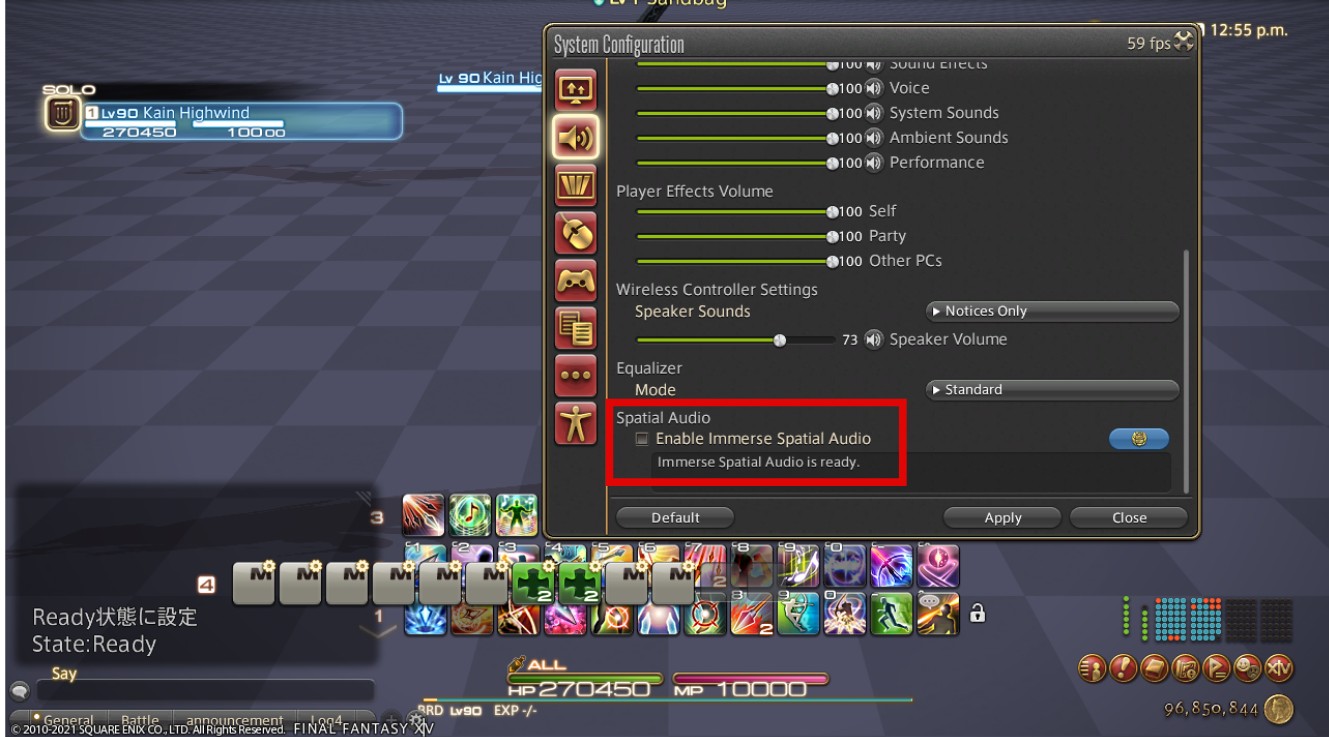
- Return to FFXIV game to enable Immerse Spatial Audio:
a. Click on Start --> System Configuration --> Sound Setting --> Spatial Audio.
b. Check the box 'Enable Spatial Audio' to complete the setup, and you see the message 'Immerse Spatial Audio is on,' click on 'Apply.'