How to allow Immerse through Windows firewall?
Adding Inbound Rule:
1. From the start menu -> go to Windows Defender Firewall
2. Click on: Allow an app or feature through Windows firewall.
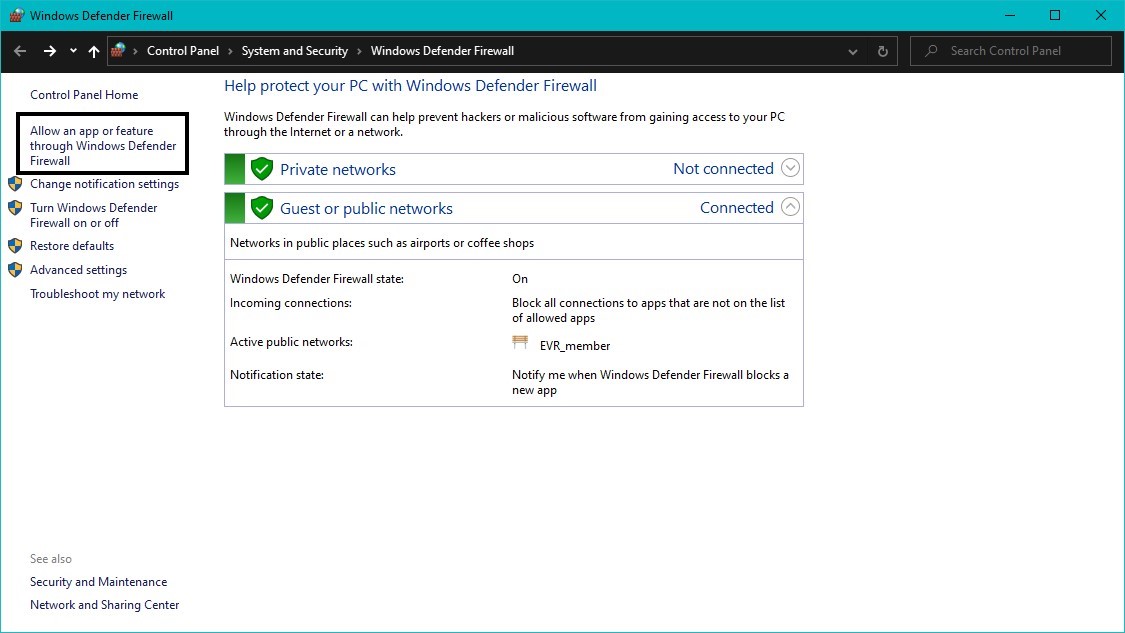
3. Click on “Change settings” on the right top.
4. Click on “Allow another app”:
5. Click on Browse.
6. Select Immerse (C:\Program Files\Embody\Immerse product name).
7. Check both boxes for private and public.
Adding Outbound Rule:
1. Now go to “Advanced Settings”
2. Click on “Outbound rule” -> “New rule"
3. Click on Rule type, select “Program”
4. Browse to the location of Immerse and select it.
5. Check “Allow Connection”. Set it for Domain, Private and Public and click Finish.
Related Articles
I'm getting the error "Please check your internet connection and try again" but I am connected to the internet. What do I do?
If you're seeing this error message despite having an active internet connection, there are two common causes. Try both fixes below. Fix 1: Enable TLS 1.2 Make sure you have selected TLS 1.2 under your machine's internet options: Control Panel > ...How to record Immerse audio using Audacity?
If you face a sound-related issue, we request you to audio record and share that with us. You can use any recording tool; we are sharing how you can use Audacity for audio recording. If you don't have Audacity, please download Audacity. 1. For the ...I am experiencing muffled, distorted, or otherwise peculiar sound with Immerse.
If you are experiencing muffled, distorted, or otherwise peculiar sound with Immerse, it is likely that you have other 3D audio processing running in the background. It is important to disable any other spatial audio or surround sound solutions when ...What makes Immerse special?
With Immerse, in gaming, you hear the precise location of sound cues such as enemy footsteps, reload sounds, or environmental ambiences, with more accuracy and realism, especially for sounds that you can't see on screen. Immerse achieves this by ...What is Immerse?
Immerse is a revolutionary new audio technology developed by Embody for passionate music lovers, gamers, and audio professionals alike. Immerse is a personalized spatial audio technology that utilizes Artificial Intelligence (AI) to scan an image of ...