How to record Immerse audio using Audacity?
If you face a sound-related issue, we request you to audio record and share that with us. You can use any recording tool; we are sharing how you can use Audacity for audio recording.
If you don't have Audacity, please download Audacity.
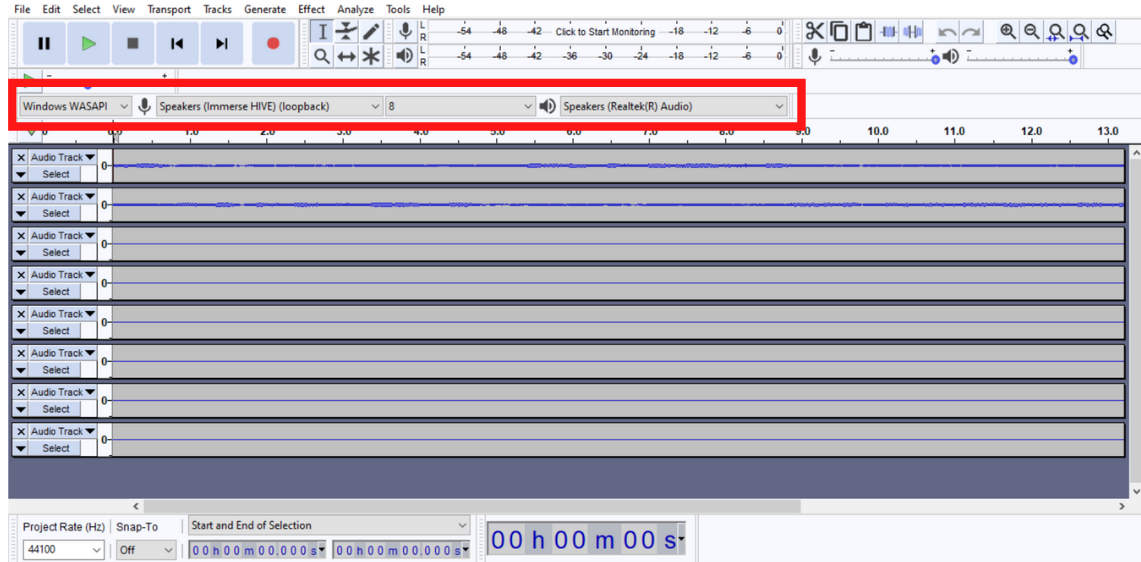
1. For the final Immerse Audio Output: in this case, please select Recording Channel 2. Whatever Output Device you pick on Immerse software, please pick the same one in the Audacity 'Recording Device' dropdown option. For example: if your headset is connected, you will pick that in your Immerse Output Device dropdown menu and pick the same headset's option in the Audacity 'Recording Device' dropdown menu. So, where ever you are finally getting your audio output, that is what we want you to record, and make sure you select the same in Audacity 'Recording Device'. Please select as below in Audacity: Audio Host -- Windows WASAPI, Recording Device--Headset or Speakers(Realtek(R) Audio), Recording Channels -- 2

2. Input to Immerse: which is Speakers(Immerse). Please select the Speakers(Immerse) option in the Audacity 'Recording Device' dropdown menu, and in this case, please select recording channel 8. Please select as below in Audacity: Audio Host -- Windows WASAPI, Recording Device-- Speakers(Immerse), Recording Channels -- 8
Related Articles
What is Immerse?
Immerse is a revolutionary new audio technology developed by Embody for passionate music lovers, gamers, and audio professionals alike. Immerse is a personalized spatial audio technology that utilizes Artificial Intelligence (AI) to scan an image of ...I am experiencing muffled, distorted, or otherwise peculiar sound with Immerse.
If you are experiencing muffled, distorted, or otherwise peculiar sound with Immerse, it is likely that you have other 3D audio processing running in the background. It is important to disable any other spatial audio or surround sound solutions when ...What makes Immerse special?
With Immerse, in gaming, you hear the precise location of sound cues such as enemy footsteps, reload sounds, or environmental ambiences, with more accuracy and realism, especially for sounds that you can't see on screen. Immerse achieves this by ...How to download Immerse software?
Embody has three Immerse product lines. You can download Immerse Gaming software from here. You can download Immerse Gamepack software from here. Please note: some Gamepacks are shipped with the game itself, and no separate download is required like ...What are the system requirements for Immerse?
For Immerse Gamepack, since they are integrated inside the game, the requirements follow installation for each game title. Refer to the game developer's resources for minimum specifications. Here are the minimum system requirements for Immerse ...