FFXIV | Profile Issues and Data Corruption
I am getting an error 'your profile data has been corrupted or deleted' in Immerse Gamepack Final Fantasy XIV, what should I do?
If you are seeing this error:
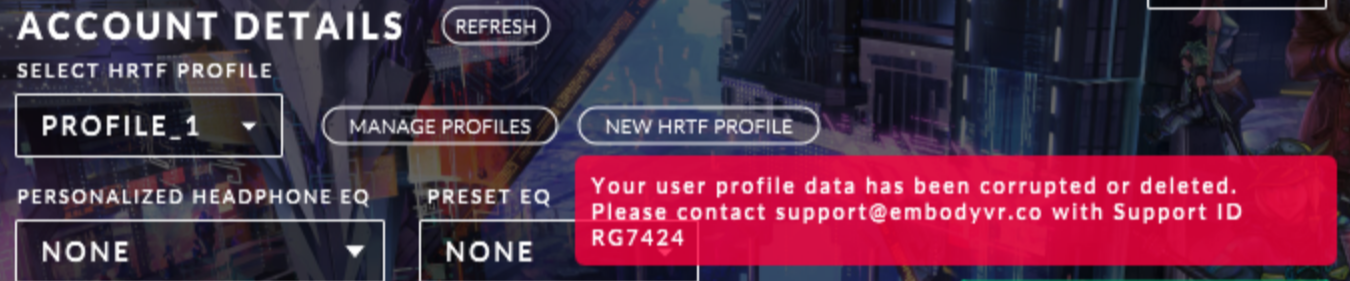
We have fixed this issue in our latest version. Please uninstall and install the latest version from our website (http://www.embody.co/ffxiv-download), and it should fix the issue for you.
If the issue persists, please completely uninstall the Immerse Gamepack FFXIV application by using the uninstall app command in Windows, then reinstall.
Program crashes when trying to load the QR code and create my profile.
Please open the game System Configuration (Sound Settings) and click 'Enable Immerse Spatial Audio.' It will prompt you to create your profile in a web browser window instead of the Desktop application. Please follow the steps there, and you should be able to move forward.

I am getting an error "You have reached the maximum number of downloads for this profile."
Please reach out to us with your assigned license code at [embody.co/help] , and we'll be happy to increase the limit for you.
Your license code can be found in the Gamepack software UI.
Related Articles
What is Immerse Gamepack FFXIV? Product Overview
What is Immerse Gamepack FINAL FANTASY XIV Edition app and how it is different from other Immerse software? The best part of the Immerse Gamepack app is it renders full 360 personalized spatial audio of objects directly inside the game, whereas any ...FFXIV | Immerse Gamepack vs Competitors: Comprehensive Comparison
Does Immerse Gaming Software work with FFXIV. If yes, why do I need to buy a separate license for Immerse Gamepack FFXIV i.e. what are the additional benefits? There are some important differences and they don't work together. Immerse Gaming software ...FFXIV | First Launch and Profile Creation
After Installation how to launch and setup Immerse Gamepack FINAL FANTASY XIV edition? Once installation is complete, select Launch Immerse Gamepack Final Fantasy XIV to activate your license or free trial. No license code is needed on Steam. Scan ...How Personalized Spatial Audio Works
When you submit a selfie of your head and ears, our machine learning algorithms create a completely unique spatial listening profile based on your physiology, called a personalized Head Related Transfer Function or HRTF. This results in a more ...FFXIV | Setup Razer Surround Sound Headsets
How to setup Razer surround headsets or headphones with Immerse Gamepack Final Fantasy XIV? It is important to avoid running multiple spatial audio and surround sound solutions at the same time, as they will conflict with each other. The following ...